
Register by WhatsApp, adults only
Join PlayinMatch — Easy Demo ID First, Real Username in About 4 Minutes
Tap join, and the PlayinMatch desk builds your ID from a name plus a mobile number, usually in about 4 minutes. Practice before cash, if you ask. Browse the exchange on demo points for as long as you like, then add ₹200 by UPI, IMPS or bank transfer whenever you feel ready.

Start Your PlayinMatch Registration With Name and Mobile
Join PlayinMatch With a Name and Mobile Number Rohan typed his name and number once in chat at 8:00 pm and had a PlayinMatch username before 8:10; the desk opens IDs only for people aged 18+.What PlayinMatch Asks For: The Simple Two-Line Sign-Up
Two things. That is the full list a new member sends to join PlayinMatch: a name and a mobile number, typed into the WhatsApp chat that opens from the join button above. No email address, no document upload, no form with a dozen boxes to fill on a small screen.
- Name
- Use the name that matches your bank account or UPI handle. It costs nothing at sign-up, and it saves a lot of back-and-forth later when money moves in or out of PlayinMatch.
- Mobile number
- Pick the SIM you have had longest and plan to keep. Swapping numbers every season is the habit that makes account questions slow later on.
- Age
- 18 or over. The desk does not open accounts for minors, full stop.
- How many IDs
- Just yours. Household members each join PlayinMatch with their own name and number in their own chat.
Rohan Kumar on the ID and R. Kumar on the bank? Close enough for a friend, awkward for PlayinMatch, because money flows in from and back out to an account under that sign-up name, and any gap between the two spellings gets queried before cash moves.
People sometimes search for a playinmatch mail id step and expect a confirmation email. There is none. Registration happens in chat, the reply arrives in chat, and the password is changed after your first sign-in (the PlayinMatch login page covers that screen field by field). Short and done.
Why the mobile number does double duty on PlayinMatch
The number you send is more than a contact detail. Once the PlayinMatch ID exists, that mobile number can stand in for the username on the sign-in screen, and it is the first thing the desk asks for when you message about a deposit, a password reset or anything else on the account. A number you change every few months makes all of that harder.
What the desk will not ask for at sign-up: an email, a photo, a document scan or a payment. If someone claiming to be the PlayinMatch desk asks for money before the ID even exists, stop and come back through the join link on this page.
The Four-Step PlayinMatch Join Ladder, From Chat to Live Balance
Here is the whole route from a phone with no account to a PlayinMatch balance you can stake with. Most people finish the first two rungs before their tea cools.
- Write the application. Your first PlayinMatch message is the application itself, so skip the small talk; the sample below shows what Rohan sent at 8:00 pm in one go.
- Send name and mobile. Type both in one message. Something like: Rohan Kumar, 98XXXXXX10. Nothing else is needed to open the ID.
- Receive the username. The desk sets up the PlayinMatch ID and sends back a username with a temporary password, usually inside 4 minutes of your details landing. Sign in and change that password straight away.
- Fund it, or practise first. Either ask for the demo balance and look around, or make the first ₹200 deposit by UPI, IMPS or bank transfer, post the payment reference in the same chat, and the balance usually shows within about 5 minutes.
A sample first message to the PlayinMatch desk
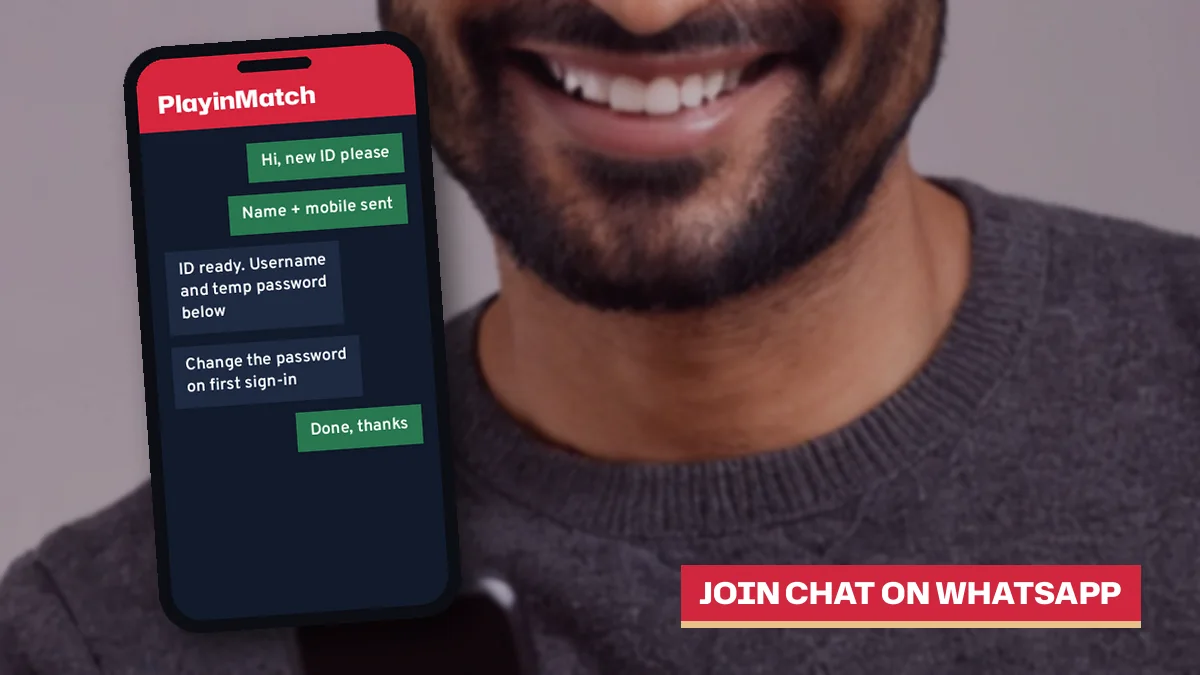
Hi, I want to join PlayinMatch. Name: Rohan Kumar. Mobile: 98XXXXXX10. Please also switch on the demo balance.
That is enough. The reply that comes back carries your username and a temporary password, and nothing in it needs to be forwarded or saved anywhere except your own notes. Some people screenshot the chat (sensible) and then change the password and forget they did (less sensible, but it happens).
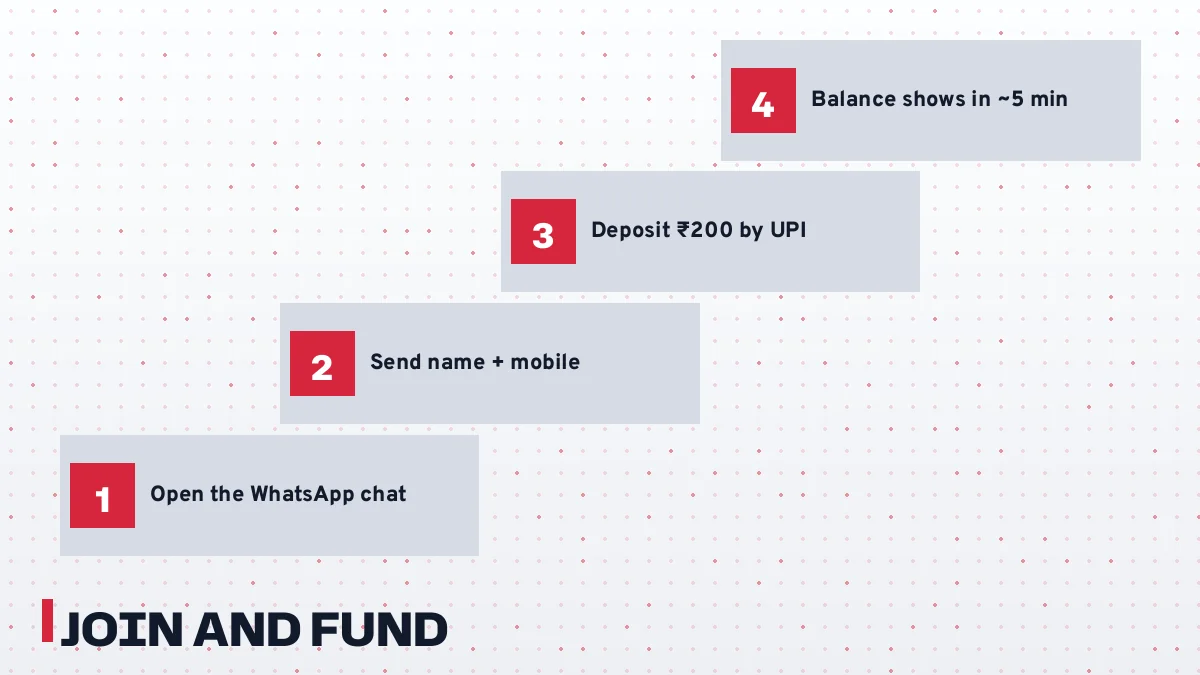
Rung four is optional on day one. Nothing on PlayinMatch forces a deposit the moment the username arrives; stop after rung three, poke around the demo, and fund the ID a day or two later if that suits you.
In practice the ladder rarely runs into trouble on the first two steps; where it slows down is rung four, when a payment comes from a family member's UPI handle instead of the account holder's own, and the PlayinMatch desk has to ask about it before anything is credited.
Try the Free PlayinMatch Demo ID Before Any Deposit
Not sure yet? Fair enough. The PlayinMatch desk can switch on a practice balacne on your new ID, made of points with no real money behind them, so you can see how the exchange behaves before a rupee leaves your bank.
Ask for it in the same message as your name and mobile, or any time after the username arrives; the demo sits on the same ID, so there is no second account to remember and nothing to migrate when you switch to real funds later.
What is it actually good for? Mostly for learning where things are. On the Play in Match exchange screen, back and lay prices sit side by side, and the first time you see them it is easy to tap the wrong column. A practice balance lets you make that mistake for free.
| Thing to try on the demo | What you learn |
|---|---|
| Place a back bet on a cricket match | How the stake box and the possible return line up |
| Place a lay bet on the same match | Why lay asks for more balance than back |
| Open the In-Play list | Which matches are live right now and how fast prices move |
| Check My Bets after a market settles | Where settled results land on PlayinMatch |
One caevat. Points are points. A big demo win does not turn into cash, and nobody at PlayinMatch can convert it, so treat the practice round as a map of the screens and nothing more.
Moving from demo points to a real PlayinMatch balance
There is no switch to hunt for. Because the practice balance lives on the same PlayinMatch ID, going real simply means making the first ₹200 deposit and posting the reference to the desk; the username, password and saved settings stay exactly as they were. If you want more practice later, before trying a market type you have not used, ask the desk in the same chat what it can switch on for your ID.
How Long Joining PlayinMatch Takes: A Fast Minute-by-Minute Example
The headline figure is about 4 minutes for the username. That is the typical case, though, and a real first evening on PlayinMatch has a few more moving parts, so here is a worked example built only from the desk's usual timings.
| Clock | What happens | Typical gap |
|---|---|---|
| 8:00 pm | You tap the join link and send name plus mobile | Start |
| 8:05 pm | Desk replies in chat | About 5 minutes for a first reply |
| 8:09 pm | Username and temporary password arrive | Usually inside 4 minutes of your details |
| 8:11 pm | You sign in, set a new password, ask for demo points | Your own pace |
| 8:30 pm | You pay ₹200 by UPI and post the reference | Whenever you choose |
| 8:35 pm | Balance shows on the ID | About 5 minutes after the reference |
So roughly ten minutes from tap to a working PlayinMatch login, and about five more after you pay. Hard to say exactly for any one evening (a big match night keeps the desk busier than a quiet Tuesday), but those are the usual gaps.
A lone hi at 8:00 pm, followed by your details at 8:06, means the username clock starts at 8:06. Send both lines up front.
A small habit speeds up PlayinMatch registration more than anything else: put both details in your very first message, spelled the way your bank spells them, and keep the chat open until the username comes back.
The same PlayinMatch sign-up on a busy match night
Take a second evening, this time with a big cricket match about to start. You send your details at 7:20 pm. The first reply might take the full 5 minutes or a little more, the username still usually follows within about 4 minutes of the desk picking up your details, and a ₹200 UPI deposit posted at 7:35 pm would usually show by around 7:40 pm. Tight, but workable before the first ball. If you want to be sure, join PlayinMatch an hour early and leave the deposit for when the toss is close.
Your First ₹200 PlayinMatch Deposit, Made Quick and Secure
₹200 is the floor. A first deposit to PlayinMatch starts at that figure, so a new member who wants to test the water with real money sends at least that much; anything smaller is below the minimum, and it is worth asking the desk before you send it.
| Method | Paid from | What to post in chat |
|---|---|---|
| UPI | Your own UPI handle | Payment reference or screenshot |
| IMPS | Your own bank account | Bank reference (UTR) or screenshot |
| Bank transfer | Your own bank account | Transfer reference or screenshot |
Where does the ₹200 go? Ask in the same chat that gave you the username; the PlayinMatch desk shares the receiving details there. Rohan, in the example above, paid at 8:30 pm, pasetd his UPI reference under the desk's last message, and saw ₹200 on the ID at roughly 8:35.
UPI, IMPS or bank transfer for a PlayinMatch deposit
With UPI, the reference number sits on the payment app's success screen, ready to copy into the PlayinMatch chat. IMPS from a bank app gives you a UTR number, which is the reference the desk wants. A regular bank transfer works the same way; the reference just tends to sit a click deeper in the bank's transaction history, so find it before you message.
Same name, every time: a deposit sent to PlayinMatch from a spouse's or friend's account, even if the amount is right, is the single most common reason a first credit sits waiting while the desk asks who paid.
Ready to fund the ID? Make the First ₹200 PlayinMatch Deposit
Keep the screenshot afterwards. If a credit ever looks missing, the desk will want your username, registered mobile, the amount, the time and that reference, and having all five in one message gets an answer faster. Cash-outs work in reverse, from ₹500 to the same account in your name; the timings live on the PlayinMatch withdrawal time page.
PlayinMatch Mobile Registration on Any Phone, Official Address Included
People type playinmatch com mobile login registration hoping for a phone version of a sign-up form. Rohan used his phone too, at 8:00 pm, and his entire registration was one chat thread on this .red address. Four moves, listed below.
- Open this page in your phone browser and tap the join link.
- WhatsApp opens; send name and mobile to the PlayinMatch desk.
- Sign in on the same browser with the username you receive.
- On Android, add the app later if you like.
Joining comes first, the app second. Once Rohan's username worked in the browser, he could add the APK whenever he liked; the PlayinMatch app download page covers that part, size and Android version included.
Android or iPhone, the PlayinMatch join steps match
Nothing about registration changes between phones. On Android you can join in Chrome, sign in there, and install the app the same evening or a month later. On an iPhone there is no App Store listing, so the browser shortcut on the home screen does the job. The ID, the balance and the demo points carry across both.
The username you get on .red is not a .red-only username. Open any mirror address the desk sends you later and the same PlayinMatch login, balance and bets are there.
A caution here. Many sites with playinmatch in the domain name belong to unrelated operators, and a quick search will show you a few of them; the safest habit, and probably the only one that matters, is to use the address the PlayinMatch desk gave you and register only through the chat that opens from it.
When Joining PlayinMatch Stalls: Quick Fixes for Common Snags
Most sign-ups go through without a hitch. A few do not, and the reasons repeat, so here they are with what to do about each one.
- No reply in the chat after several minutes
- The first reply usually comes within about 5 minutes. Send your name and mobile again in one message rather than a string of short pings; the PlayinMatch desk answers in order and a single complete message is easier to act on.
- You typed the wrong mobile number
- Tell the desk in the same chat before the username comes back. It is a quick edit at that point, and much messier once the ID is live.
- An old PlayinMatch username is lying around somewhere
- Put it in your first message next to your name. The desk can then pick up that account, which saves a new sign-up being refused halfway.
- The temporary password does not work
- Copy it exactly, with no extra space at the end. Still stuck? Ask the desk for a reset; there is no self-serve email reset, and a fresh password takes a few minutes.
- Deposit paid, balance still empty
- Check the reference was posted in the chat, not just paid. Then check the paying account is in your own name. If both are right, send username, mobile, amount, time and the reference together.
- Signing up for a younger brother or sister
- Not possible. The PlayinMatch ID belongs to the adult who sends their own details, and nobody below 18 gets one.
- Demo points will not cash out
- They never will. The practice balance is points with no real money behind it; only a real deposit turns into a withdrawable balance.
- The site will not open at all
- Usually a blocked address. Try another mirror the desk shared, or the Android app; the same login works everywhere.
Sometimes two snags stack up. A member pays from a joint account, for example, where the first name on the account is a parent's, and then also posts a blurry screenshot that hides the reference. Expect questions on both points: send a clearer screenshot or the typed reference, explain whose account it was, and let the PlayinMatch desk decide what it can credit.
None of these need a new account. Fixing the old one is almost always quicker, and it keeps your PlayinMatch history in one place.
Before the first ₹200 leaves your account, spend two minutes on your own state's rules. A 2025 central act covers online money games, some states go further on betting, and this page makes no claim that PlayinMatch is lawful where you live.
- join playinmatch
- playinmatch com mobile login registration
- playinmatch new id kaise banaye
- playinmatch registration whatsapp
- playinmatch demo id
- playinmatch id password
- playinmatch mail id
- playin match sign up
- playinmatch minimum deposit 200
PlayinMatch Join Questions, Answered Fast
How do I join PlayinMatch?
Write one WhatsApp message containing your name and mobile number to the PlayinMatch desk, reached from the join link here. About 4 minutes later a username and a temporary password normally appear in that chat. Sign in with them, replace the temporary password, and the ID is yours.
Do I need an email address to register on PlayinMatch?
No. PlayinMatch registration runs entirely through WhatsApp chat, and the desk only needs your name and a mobile number to open the ID. There is no confirmation email, and password resets also go through the desk in chat rather than by mail.
Can I try a PlayinMatch demo ID before depositing?
Yes. Ask the desk to switch on a practice balance when you join or any time after. It holds points with no real money behind them, sits on the same ID as your real account, and lets you see the exchange and markets before you pay anything.
What is the minimum deposit after joining PlayinMatch?
₹200. That is the smallest amount a new PlayinMatch member can put in, and it has to leave a UPI handle or bank account carrying the same name you gave at sign-up. Paste the reference in the join chat afterwards; credit tends to follow in about 5 minutes.
Can I open two PlayinMatch accounts?
No. The rule is one ID per person, and holders must be 18 or older. If you had a PlayinMatch ID before, mention it in the chat so the desk can look at the old account. A second ID under the same name or mobile will not be issued.
Is playinmatch.com mobile the right place to register?
Use only the address the PlayinMatch desk gave you. Many sites with playinmatch in the name are run by unrelated operators, and look-alike pages can be phishing traps. This .red address is one official mirror, and the same ID and balance work on every mirror the desk shares.
Join PlayinMatch in Minutes: Trusted Sign-Up Recap
How to join PlayinMatch from this registration page
From the join button to a working PlayinMatch username: roughly 4 minutes after your name and mobile reach the desk, at any hour. Adults of 18+ only, and never two IDs for one person.
- Tap the join link
- Send name and mobile
- Sign in, change the password
- Try demo points or deposit ₹200
What a playinmatch com mobile login registration search should lead to
No separate phone form exists. Mobile registration is the same chat, and the ID then signs in on the phone browser, the Android app or any mirror the desk shares.
Money and timings covered on this join page
| Item | Figure |
|---|---|
| Username after details sent | About 4 minutes |
| First deposit | ₹200 minimum |
| Credit after posting reference | About 5 minutes |
The ₹200 can travel by any of three rails; the paying account carries your sign-up name, and the reference goes in the join chat.